

Last updated: April 13, 2026
Most developers assume the hardest part of switching between Django and WordPress is learning new syntax. It isn’t. The real challenge is unlearning the mental model from one framework before it corrupts your work in the other.
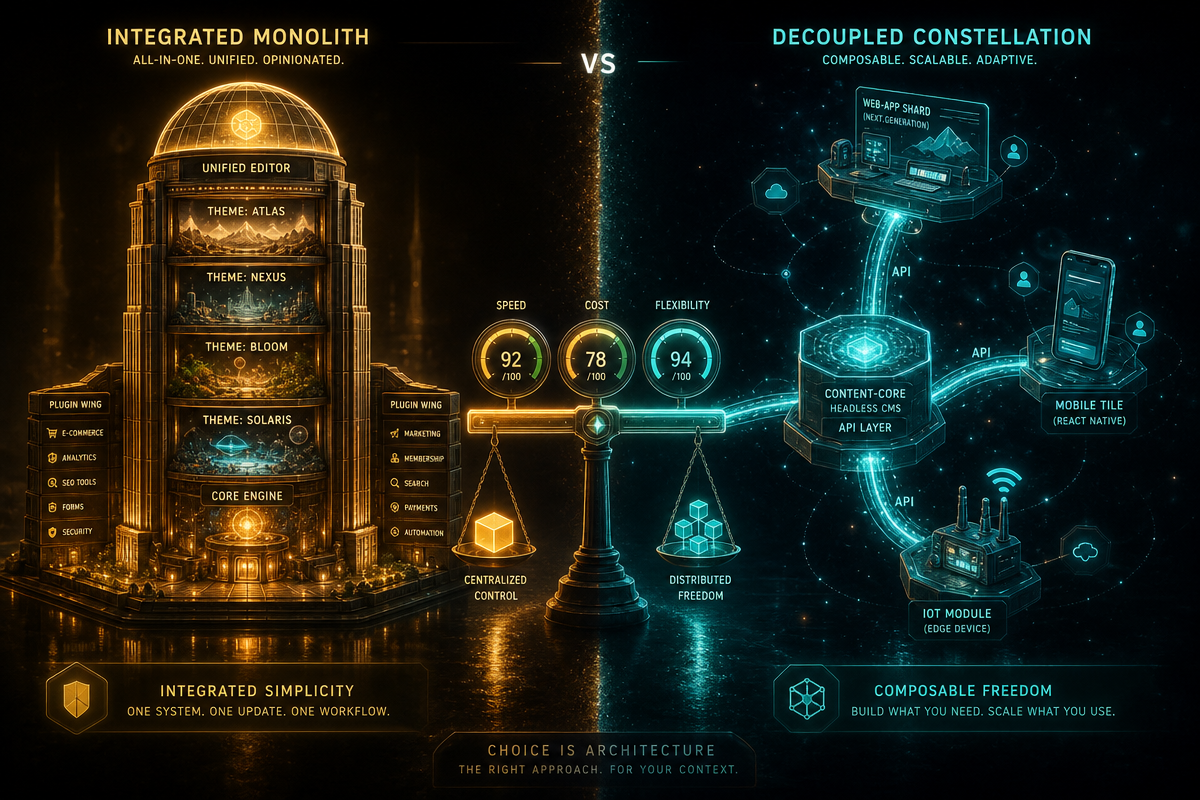
Django vs WordPress development is less a technical comparison and more a philosophical one – and getting that philosophy wrong means you’ll build the right thing in completely the wrong way. This guide maps the structural concepts you actually need: projects, apps, themes, plugins, and how they compose into sites. Whether you’re a WordPress veteran exploring Python frameworks or a Django developer asked to “just set up a quick WordPress site,” this will save you a week of confusion.
Prerequisites – What You Need Before You Start
Image: alfyi.com
You don’t need deep expertise in both platforms, but you need a working mental model of at least one. On the Django side, you’ll want Python 3.10+ installed, pip, and ideally a virtual environment manager like venv or pipenv. On the WordPress side, a local development environment – LocalWP is excellent for this – and basic familiarity with PHP concepts will carry you far. Useful to have: an understanding of MVC architecture (Model-View-Controller, a pattern for separating data logic from display), and a rough sense of what a database ORM does (it lets you query databases using Python objects instead of raw SQL).
How Django Structures a Project
Django’s structure is explicit by design. A Django project is the top-level container – think of it as the entire building. Inside that building, you have apps, which are self-contained modules that handle one area of functionality. A project might contain an accounts app, a blog app, and a shop app. Each app has its own models (database structure), views (logic), and templates (HTML output).
The practical upshot: if you want to add a blog to a Django project, you create or install an app. Nothing is assumed. Nothing is pre-built. You’re composing discrete units of functionality like Lego bricks. This is powerful and precise, but it means the initial setup cost is higher than WordPress. If you hit a rough patch during deployment, Django’s error messages can be cryptic – this troubleshooting guide on the setuptools.build_meta import error is worth bookmarking before you need it.
How WordPress Structures a Site
WordPress uses a different vocabulary for similar concepts. There’s no explicit “project” – the entire WordPress installation is the project. Functionality gets added through plugins (roughly analogous to Django apps) and presentation is controlled by themes (which have no real Django equivalent, because Django doesn’t separate them so cleanly).
A WordPress theme controls layout, typography, colour schemes, and often templates for specific content types. Plugins handle features: WooCommerce for e-commerce, Yoast for SEO, ACF for custom fields. The key difference from Django: WordPress assumes certain things exist by default. Posts, pages, users, comments – they’re baked in. You’re extending a working system rather than composing one from scratch.
Step 1 – Map the Equivalent Concepts
Here’s where most developers go wrong: they try to find one-to-one equivalents instead of understanding what each concept does.
| Django | WordPress | What it actually does |
|---|---|---|
| Project | Installation | Top-level container |
| App | Plugin | Adds discrete functionality |
| App (views/templates) | Theme (templates) | Controls display output |
urls.py |
Rewrite rules / permalinks | Routes URLs to content |
| ORM models | Custom post types + meta | Defines data structures |
The analogy that clicks for most people: Django is like building a custom piece of furniture from raw timber. WordPress is like buying flat-pack furniture and customising it. Both can produce the same result. The process, skill set, and time investment are completely different.
Step 2 – Understand Where Each Framework Wins
Practitioner scenario one – the content-led brochure site. A regional law firm needs a professional site with a blog, service pages, and a contact form. The content team wants to update copy without raising a ticket every time. WordPress is the right call. You install a well-maintained theme, add a form plugin, configure Yoast, and hand over a site the client can actually run. If you built this in Django, you’d spend the first two weeks rebuilding the admin, the CMS, the image handling, and the URL routing that WordPress gives you on day one.
Practitioner scenario two – the booking app with custom workflows. A veterinary group wants online appointment booking that checks real-time availability across four clinics, applies service-specific slot durations, sends SMS reminders, and integrates with their practice management system. WordPress will fight you the entire way. Django’s ORM handles the data relationships cleanly, the admin panel auto-generates a management interface from your models (genuinely one of the best things in web development, full stop), and you’re writing application logic rather than wrestling with plugin hooks.
Django wins when you need custom business logic, fine-grained control over data, or you’re building something that doesn’t fit the “content site” mould – a SaaS dashboard, a REST API, a booking system.
WordPress wins when you need to ship a content-heavy site quickly, when your client wants to manage content themselves without developer involvement, or when the plugin ecosystem already solves your problem. WooCommerce has amassed over 344 million downloads and powers a substantial share of online stores worldwide – a level of community testing and plugin compatibility you don’t replicate by building from scratch.
Performance is more nuanced than people admit. A badly built WordPress site can crawl, but a well-optimised one is fast – and the gap narrows considerably with proper caching, image compression, and a CDN. These 15 speed fixes apply to WordPress regardless of your stack choices. Django tends to have fewer default abstraction layers to get through, which gives it a head start, but implementation quality matters far more than framework choice for most real-world sites.
Step 3 – SEO Implications for Each Stack
SEO is where the choice of framework has consequences that compound over time.
WordPress has a significant practical advantage for editorial SEO. The Yoast and Rank Math plugins surface optimisation guidance inline as writers work – no developer required. URL structures (called permalinks) are configured from the admin dashboard. Schema markup (structured data that helps search engines understand your content) is largely automated. For content teams publishing dozens of articles per month, this matters.
Django gives you total technical SEO flexibility, which is a double-edged sword. You control URL structure precisely, render metadata programmatically, and integrate schema markup exactly as the spec requires – but you have to build all of it. There are no shortcuts. Canonical tags, Open Graph metadata, XML sitemaps – each needs deliberate implementation. For sites where technical SEO is a competitive differentiator, that control is valuable. For most content sites, it’s overhead.
The honest summary: WordPress makes SEO accessible. Django makes SEO precise. If your team includes non-developers who own the content, WordPress’s editorial workflow support is a genuine advantage that outweighs Django’s flexibility for most use cases.
Step 4 – Choose Your Mental Model Before You Write Code
Before touching either framework, answer this: is your project primarily a content management problem or an application logic problem?
Content management problem (lots of pages, editors need control, SEO matters heavily) – WordPress is probably the better starting point. Application logic problem (custom workflows, complex data relationships, API integrations) – Django. The mistake is picking the tool you’re comfortable with and then fighting the framework’s grain for the entire project. Frameworks have opinions. Work with them.
If you’re redesigning an existing site rather than starting fresh, the decision gets more complex. This 53-point redesign checklist for 2026 covers the questions you should be asking regardless of which platform you land on.
What Migration Actually Looks Like
Switching platforms mid-project – or inheriting a site and needing to move it – is more common than framework advocates admit.
WordPress to Django is typically a data migration problem. WordPress exports content as XML (the WXR format), and libraries like django-wordpress or a custom management command can import posts, pages, and metadata. The harder work is rebuilding the frontend and admin experience you were getting for free, and correctly redirecting URLs so you don’t haemorrhage search equity on the transition.
Django to WordPress happens when a technically correct application becomes unmaintainable by a non-developer team. The data migration is straightforward enough if your models map cleanly to WordPress post types. The real cost is accepting WordPress’s structural assumptions after building something bespoke – some data relationships simply don’t translate tidily.
Either direction, plan for four things: URL redirect mapping (preserve your SEO equity), user account migration (password hashes between systems are incompatible – you’ll need a reset flow), media asset transfer, and a thorough QA period on a staging environment before cutting over.
Troubleshooting – Common Mistakes When Switching Frameworks
Treating WordPress plugins like Django apps. Django apps are modular and relatively isolated. WordPress plugins share a global namespace and can conflict badly. Always test plugins on a staging environment – never activate an untested plugin on a live site.
Forgetting Django’s INSTALLED_APPS. New Django developers create an app, write models, then wonder why the database tables don’t appear. Every app must be registered in INSTALLED_APPS in settings.py before Django acknowledges its existence. Simple, but easy to miss.
Myth: WordPress can’t handle complex applications. Reality: WordPress can handle significantly more complexity than its reputation suggests, especially with the REST API and block editor (Gutenberg). That said, there’s a ceiling. Once you’re writing more custom PHP to work around WordPress than with it, Django or another framework is worth evaluating seriously.
Where to Go From Here
The next step is building something small in whichever framework is less familiar to you. A blog in Django. A custom plugin in WordPress. The concepts solidify fastest through practice, not reading. The Django documentation is genuinely excellent – one of the best in open source. The WordPress developer resources site is comprehensive, if occasionally dense.
Both platforms have thriving communities and long commercial futures. This isn’t a zero-sum choice. The developers who understand both are the most valuable ones on any team.
If you’re weighing up Django vs WordPress for your next project and want an expert opinion before committing, DRS Web Development builds custom websites and web applications for businesses of all sizes – from brochure sites to full-stack Django applications. Get in touch at drs-web.co.uk/contact for a free consultation.
Frequently Asked Questions
Q: What is the main difference between Django and WordPress development?
A: Django is a Python framework for building custom web applications from the ground up, offering precise control over logic and data. WordPress is a content management system with pre-built functionality extended through plugins and themes. The choice depends on whether your project is primarily a content management problem or a custom application logic problem.
Q: What is a Django app vs a Django project?
A: A Django project is the top-level container for your entire site or application. A Django app is a self-contained module within that project that handles one area of functionality – such as a blog, user accounts, or an online shop. One project can contain multiple apps.
Q: Which framework is better for SEO?
A: WordPress has a practical advantage for content-led SEO, with plugins like Yoast surfacing optimisation guidance as writers work and automating schema markup. Django gives you total technical control over URLs, metadata, and structured data, but you build everything yourself. WordPress is the better default for content-heavy sites; Django rewards investment in technical SEO at scale.
Q: What does migrating from WordPress to Django actually involve?
A: WordPress exports content as WXR (XML), which can be imported via Django management commands or libraries like django-wordpress. The harder work is rebuilding the admin and frontend experience, mapping URL redirects to protect search rankings, and handling user account migration – password hashes between systems are incompatible, so plan for a reset flow.
Source: https://www.webnzee.com/2026/03/
This article was researched and written with AI assistance, then reviewed for accuracy and quality. Riya Shah uses AI tools to help produce content faster while maintaining editorial standards.
Need help with your web project?
From one-day launches to full-scale builds, DRS Web Development delivers modern, fast websites.