

Last updated: July 25, 2026
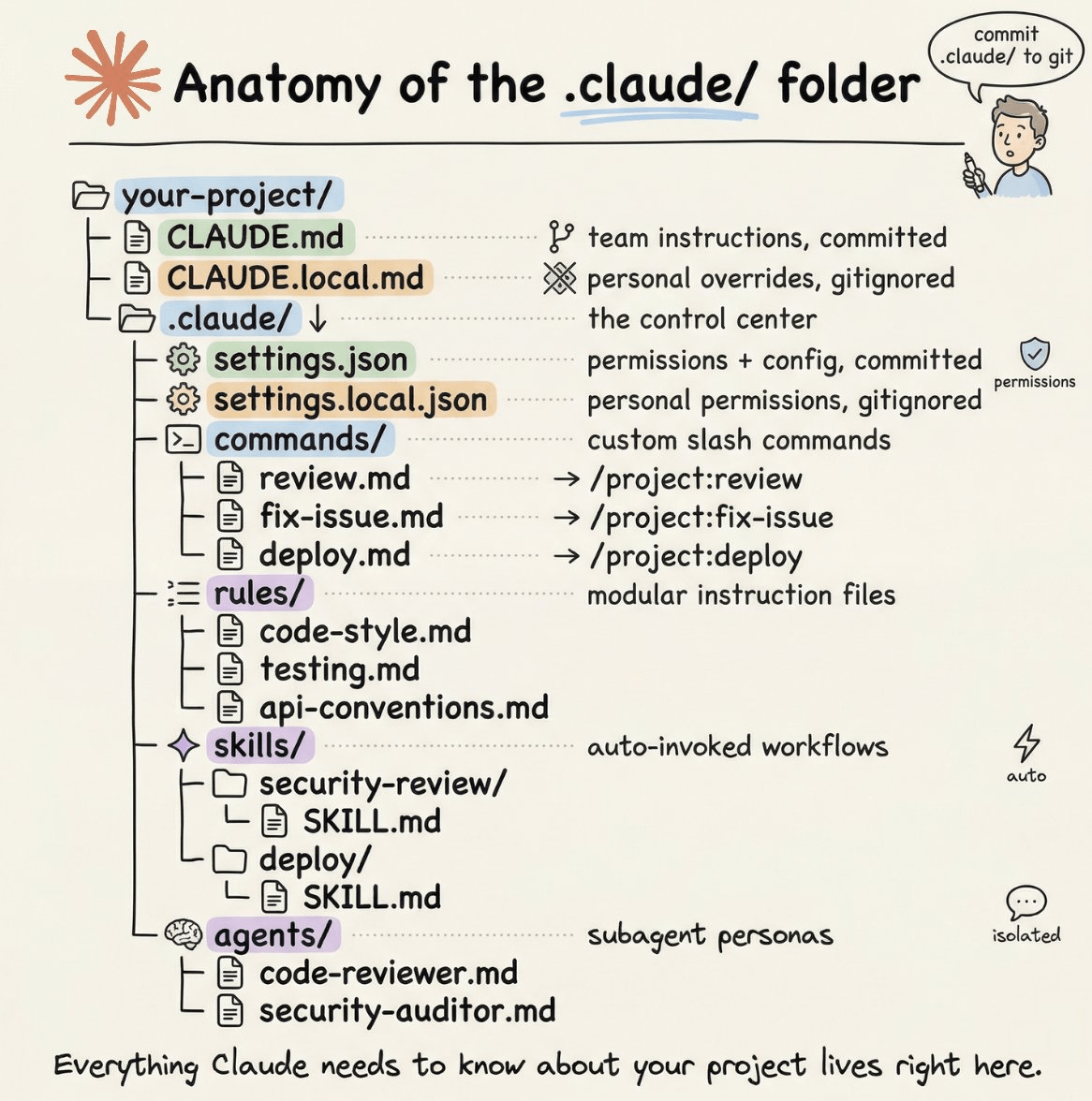
Image: Claude Directory (image hosted via Substack CDN)
You’re mid-sprint, deep in a JWT authentication flow, and your AI coding assistant is cheerfully suggesting you log the token payload to the console for debugging. That moment – the one where the tool meant to help you moves faster than your security instincts – is exactly why the Claude Code security setup conversation matters right now.
The good news: a growing ecosystem of defensive configurations means Claude Code can be hardened at the permission and hook layers, not just by hoping the model refuses. Claude Directory catalogues hundreds of security-focused items – skills, agents, hooks, MCP servers, and guides – purpose-built for developers who need an AI pair-programmer that respects security boundaries. Here are the patterns worth understanding.
1. The Built-in /security-review Command and Permission Deny Rules
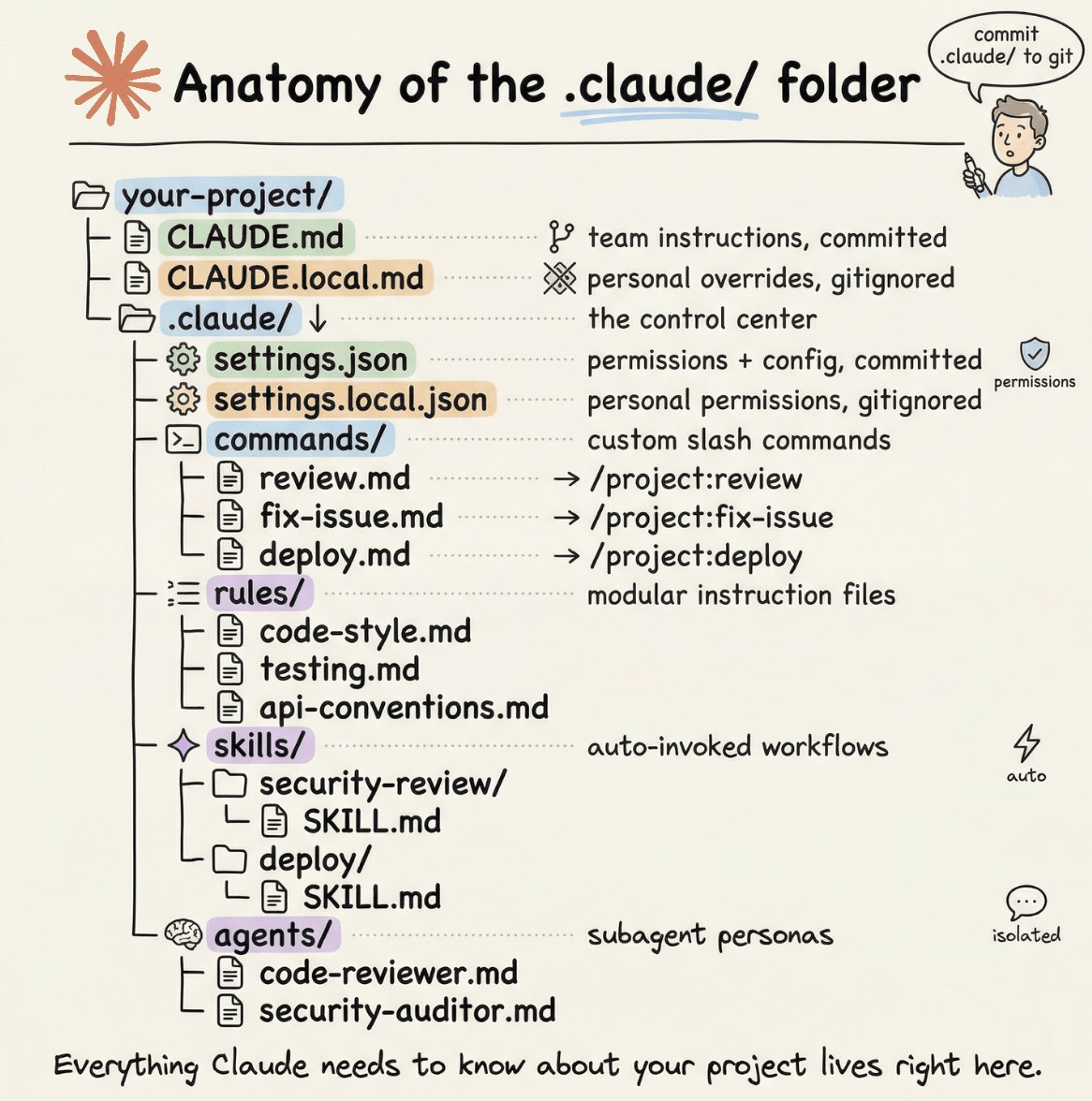
Image: Claude Directory (image hosted via Substack CDN)
The fastest win is the /security-review slash command, which audits your current Git branch for vulnerabilities. Point it at a branch containing new authentication code and it will flag issues before they reach code review. No plugin required.
Worth noting: /security-review runs a model-driven analysis of your staged diff, not a deterministic scanner like Semgrep or Snyk. It catches patterns and misconfigurations well, but treat its output as a first-pass triage rather than a compliance gate. It’s fast precisely because it doesn’t do the slower analysis of a full static tool.
Underneath that, the permission system in .claude/settings.json lets you write explicit deny rules for dangerous shell operations. Here is a minimal config worth checking into your repository today:
{
  "permissions": {
    "allow": [
      "Bash(git:*)",
      "Bash(npm run:*)",
      "Bash(npx tsc:*)"
    ],
    "deny": [
      "Bash(rm -rf:*)",
      "Bash(curl:* | sh)",
      "Bash(psql:*prod*)"
    ]
  }
}
Run /permissions inside a Claude Code session to see what is currently allowed, adjust the list, then commit the file. Every developer on the team inherits the same boundaries. The model never gets the chance to run blocked commands, because the permission layer stops them cold. Principle of least privilege, applied to your coding assistant. The same approach works well for containerised environments – see the Docker Docs for context on scoping container permissions alongside your AI tooling.
2. A Concrete Walkthrough: Stopping a Credential Leak Mid-Debug
Here is the scenario in detail. You are debugging a failing JWT verification. The assistant suggests:
console.log('token payload:', decoded)
Reasonable instinct. Terrible in production. The decoded object typically contains user ID, roles, and expiry – exactly what you do not want in your log aggregation service.
With a PostToolUse hook configured to scan for known secret patterns, that suggestion gets flagged before the file is written. The hook runs a shell command against the proposed edit, matches console.log.*token|payload|secret|password, and surfaces a warning. The safer alternative the assistant offers instead – console.log('token verified, exp:', decoded.exp) – logs only the expiry timestamp. Same debugging signal. No credential exposure.
This is the before/after that matters. Before: the assistant writes what works fastest. After: the hook rewrites the contract so “fastest” and “safest” point in the same direction.
3. Hook-Layer Defences That Don’t Rely on the Model
You might think the model itself is your last line of defence against leaking secrets – but actually, that is a fragile assumption. The env-leak-detector and prompt-injection-defence hooks intercept before the model ever processes the content. If a .env value is about to leave your environment, the hook catches it. If an untrusted instruction is trying to hijack the model’s behaviour, the hook blocks it.
Deterministic. It either triggers or it does not.
That said, hooks do generate friction. A pattern-matching hook on environment values will occasionally fire on a variable name that resembles a secret but is not one – DATABASE_POOL_SIZE, say, or STRIPE_TEST_MODE. Budget time to tune your patterns in the first week, or you will find developers disabling hooks rather than working around them. False positives are the silent killer of security tooling adoption.
4. Claude Code Security Setup: Framework-Aligned Skills
The security-focused skills catalogued on Claude Directory are mapped to the frameworks your security team already uses. AI Security skills align with MITRE ATLAS. Cloud Security and Red Team skills follow MITRE ATT&CK. Incident Response skills follow the NIST SP 800-61 lifecycle, covering preparation, detection, containment, and recovery in sequence [citation needed].
This alignment means output from a Claude Code skill can slot directly into a security report or incident ticket without translation. If your team runs OWASP-aligned audits, there is a dedicated skill for that too. The framework alignment is useful because it means the assistant’s output uses the same vocabulary as your existing runbooks – you are not translating between “the AI found a thing” and “this maps to ATT&CK technique T1078.”
5. Dependency Auditing with deps-audit
The deps-audit skill connects Claude Code to the GitHub Security Advisory (GHSA) database, cross-references your package.json, and produces a prioritised remediation plan. That is the difference between running npm audit and receiving a wall of CVE identifiers versus getting a ranked list with actionable next steps.
For teams maintaining large dependency trees – common in WordPress plugin development or any project with a sprawling node_modules folder – this kind of triage saves hours. Knowing which problem to fix first is the entire value proposition.
6. CISO Advisor: Compliance Without the Spreadsheet Hell
The CISO Advisor skill targets governance across SOC 2, ISO 27001, HIPAA, and GDPR simultaneously, and it quantifies risk in dollar terms rather than abstract severity ratings. Your security posture gets translated into business language automatically.
For developers who interface with compliance teams, this closes a perennial communication gap. Instead of explaining what a misconfigured S3 bucket means technically, you produce a figure that lands in a boardroom conversation. Whether the dollar figures are accurate depends on how well you configure the risk context – garbage in, garbage out applies here as much as anywhere.
Back to that moment in your JWT flow – the one where the assistant was about to log your token. With a PostToolUse hook scanning for credential patterns, a deny rule blocking raw database access, and a /security-review run before merge, that moment becomes a near-miss rather than a production incident. The configuration did the work your instincts were too busy to catch.
The shift here is not about trusting AI less. It is about applying the same defence-in-depth you would build around any tool with production access – and tuning it carefully enough that your team actually keeps it switched on.
Frequently Asked Questions
Q: What is a Claude Code security setup and why does it matter for developers?
A: A Claude Code security setup is the combination of permission rules, hooks, and skills that constrain what your AI coding assistant can do and access. It matters because AI assistants can introduce vulnerabilities through overly broad shell access or accidental secret exposure if left unconfigured.
Q: How does the /security-review slash command work in Claude Code?
A: The command runs a model-driven analysis of your current Git branch, surfacing potential vulnerabilities in your staged changes. It is a fast first-pass triage tool rather than a deterministic scanner – useful for catching misconfigurations and insecure patterns, but not a substitute for tools like Semgrep or Snyk in a compliance pipeline.
Q: Can Claude Code accidentally leak .env secrets?
A: Without the env-leak-detector hook, there is a risk that environment values could be exposed through model output or tool calls. The hook intercepts before the model processes the content, making it a deterministic control rather than a model-level best-effort. The trade-off is occasional false positives on variable names that resemble secrets but are not.
Q: Do security hooks slow down the development workflow noticeably?
A: The latency from a shell-based hook is typically under 100ms for pattern-matching checks – imperceptible in normal use. The bigger friction risk is false positives causing developers to bypass or disable hooks. Invest time upfront tuning your patterns against your actual codebase to keep the signal-to-noise ratio high.
Q: Which security frameworks do Claude Code skills align with?
A: Skills on Claude Directory align with MITRE ATLAS for AI security, MITRE ATT&CK for cloud and red team scenarios, and NIST SP 800-61 for incident response. Compliance-focused skills cover SOC 2, ISO 27001, HIPAA, and GDPR. The value is that output uses the same terminology as your existing runbooks, reducing translation overhead when filing incident tickets.
Q: How does the deps-audit skill differ from running npm audit?
A: npm audit outputs a list of CVE identifiers. The deps-audit skill cross-references the GHSA advisory database against your package.json and produces a prioritised remediation plan, telling you which vulnerabilities to address first and how – the ranking is what saves time in large dependency trees.
Q: Can I share permission rules across a development team?
A: Yes. Commit your .claude/settings.json to the repository and every developer inherits the same allow and deny rules. Use /permissions inside a session to review and adjust the current set before committing. This is the recommended approach over per-developer configuration, which drifts over time.
Source: https://www.claudedirectory.org/for/security
This article was researched and written with AI assistance, then reviewed for accuracy and quality. Nia Campbell uses AI tools to help produce content faster while maintaining editorial standards.
Need help with your web project?
From one-day launches to full-scale builds, DRS Web Development delivers modern, fast websites.