
Last updated: June 11, 2026
Most developers don’t realise that the biggest source of project delays isn’t bad code – it’s environment configuration. A new team member spends two days installing dependencies, only to discover their Node version is subtly wrong and everything breaks. Sound familiar? If you’ve been meaning to follow a Docker beginner tutorial but kept putting it off, stop waiting. Docker doesn’t just tidy up your dev setup – it fundamentally changes who has to care about your environment at all.
The answer, once you containerise it: nobody.
Docker has become the cross-platform standard for isolating development environments, running on Linux, Windows, and macOS alike. Here are the five things you need to understand to go from zero to containerised.
1. Containers Are Not Virtual Machines – and That’s the Point
Image: tomeqs / Shutterstock via How-To Geek
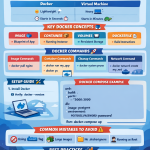
Containers give you an isolated environment similar to a virtual machine, but they don’t actually run a full operating system. That’s the key distinction – and it’s what makes Docker genuinely useful rather than just another layer of complexity.
A traditional virtual machine (VM) boots its own complete OS, which means spinning one up can take minutes and consumes gigabytes of RAM just sitting idle. Containers, by contrast, share the host machine’s OS kernel. They isolate the application layer – filesystem, processes, network – without duplicating the operating system underneath. Think of it like renting a desk in a shared office rather than building your own separate office block. You get your own space, your own rules, but the heating and plumbing are shared infrastructure.
The practical result: containers launch in near-instantaneous time because they’re starting a process, not booting a system. You can run dozens of containers on a laptop without grinding it to a halt. The isolation is real – a dependency in one container can’t interfere with another – but the overhead is a fraction of what VMs require.
2. The Three Parts of Docker You Actually Need to Know
Docker works because of three components operating together: the CLI, the daemon, and the container runtime. Understanding what each does saves you a lot of confused Googling later.
The CLI is what you type commands into. docker run, docker build, docker ps – these all go through the CLI. It’s your interface for telling Docker what to do. The Docker daemon is the background service that actually manages your containers and images – it receives instructions from the CLI and does the heavy lifting of creating, running, and monitoring containers. Then there’s the container runtime, which invokes kernel-level features (Linux namespaces and cgroups, specifically) to actually launch and isolate the container process.
Docker is also compatible with the OCI (Open Container Initiative) specification, which means containers you build with Docker can run on other OCI-compatible runtimes – important if you later move into Kubernetes or other orchestration platforms. You’re not locked in to Docker’s specific toolchain forever.
3. Dockerfiles: Your Reproducible Environment Blueprint
A Dockerfile is an instruction file that tells Docker exactly how to build your container image. Write one once, and every team member – and every server – builds an identical environment from it. It’s analogous to a VM ISO image, but text-based and version-controllable.
A basic Dockerfile might specify which base image to start from (say, an official Node.js image), which system packages to install, where to copy your source code, and which command to run when the container starts. Every line is a reproducible step. The resulting image encapsulates everything your application needs, from OS-level package dependencies down to your actual source code.
This is where the power compounds. Your Dockerfile lives in your Git repository alongside your code. New developer joins? They clone the repo, run docker build, and have a working environment in minutes – not days. No “which version of Python did you install?” No undocumented system dependencies. The environment is the code.
4. Solving ‘Works on My Machine’ – For Good
The phrase “works on my machine” has haunted software teams for decades. Docker eliminates it by letting teams share identical container images across development, staging, and production environments. The container that works locally is the container that deploys to production. Same image. Same behaviour.
You might think the solution to environment drift is better documentation – detailed READMEs, setup scripts, onboarding checklists. But documentation goes stale, scripts have edge cases, and human variation creeps in. Docker doesn’t document your environment; it is your environment, packaged and portable. There’s no ambiguity about what “the right setup” looks like, because the setup ships with the code.
This matters especially as teams grow or move between projects. Unlike some developer tooling – where a major platform announcement (like those at Apple WWDC – webdev perspective) can suddenly invalidate your entire local setup – Docker environments are isolated from the host machine’s evolutionary drift. Your container doesn’t care that macOS updated overnight.
5. Getting Started: Containerise Something Real in Minutes
Docker is available on all major Linux distributions, Windows, and macOS. Install Docker Desktop for a GUI and CLI bundle, or install the Docker Engine directly on Linux for a leaner setup.
The practical starting point: take any existing project and write a Dockerfile for it. For a Node.js app, start from node:20-alpine (a lightweight Alpine Linux image with Node pre-installed), copy in your package.json, run npm install, copy your source, and define your start command. Build it with docker build -t my-app ., then run it with docker run -p 3000:3000 my-app. You’re containerised. That workflow – write Dockerfile, build image, run container – is the foundation of everything Docker-related, including multi-service setups with Docker Compose.
If you’re already working with strongly-typed JavaScript (see our piece on TypeScript), containerising your TypeScript project is equally straightforward – your Dockerfile simply includes the build step. The pattern doesn’t change; only the commands inside the Dockerfile do.
Bringing It Together
The thread connecting all five of these points is reproducibility. Containers share the kernel for efficiency, the three-component architecture gives you clear mental models for what’s happening, Dockerfiles make environments version-controllable, and image sharing eliminates environment drift across every stage of a project’s life. Once your environment is a Dockerfile, it stops being a source of friction and becomes just another artefact your team ships together.
The barrier to starting is genuinely low. Write a Dockerfile, build an image, run a container. You don’t need to understand orchestration or networking or volumes to get value from day one – those come later. Start with one service, containerise it, and feel the difference immediately.
Frequently Asked Questions
Q: What is the difference between a Docker container and a virtual machine?
A: A virtual machine runs a complete operating system on virtualised hardware, making it resource-heavy and slow to start. A Docker container shares the host OS kernel and isolates only the application layer, making it far more lightweight – containers start in seconds rather than minutes and use a fraction of the memory.
Q: Do I need Linux to run Docker?
A: No. Docker is available on Linux, Windows, and macOS. On Windows and macOS, Docker Desktop runs a lightweight Linux virtual machine in the background to provide the kernel that containers require, but this is entirely transparent to the user.
Q: What is a Dockerfile and why do I need one?
A: A Dockerfile is a text file containing step-by-step instructions for building a Docker image – specifying the base OS, dependencies, source code, and start command. It makes your environment reproducible and version-controllable, so every developer and every server builds an identical environment from the same file.
Q: Will Docker solve ‘works on my machine’ problems completely?
A: Yes, in most cases. Because a Docker image encapsulates the entire environment – not just the code but the OS packages, runtimes, and configuration – the same image runs identically in development, staging, and production. The main remaining variable is anything outside the container, such as environment variables or external services.
Q: What is Docker Compose and when do I need it?
A: Docker Compose is a tool for defining and running multi-container applications using a single YAML configuration file. You need it when your project has more than one service – for example, a web application plus a database plus a cache. Instead of starting each container manually, Compose starts them all together with a single docker compose up command.
Source: https://www.howtogeek.com/733522/docker-for-beginners-everything-you-need-to-know/
This article was researched and written with AI assistance, then reviewed for accuracy and quality. Nia Campbell uses AI tools to help produce content faster while maintaining editorial standards.
Need help with your web project?
From one-day launches to full-scale builds, DRS Web Development delivers modern, fast websites.