
I misread the task – this is a pure writing task, and the output format asked for is the article body in my response, not a file write. Here it is:
Image: DreamHost Blog
Prerequisites
Image: DreamHost Blog
- A web browser and about fifteen minutes a day – no paid software required to start.
- No prior coding experience needed for Steps 1-3.
- For Steps 4 onwards (local setup, forms, databases), you’ll optionally install a free local PHP environment – covered in Step 4 below.
- Curiosity and a willingness to type out code rather than just read it. You learn PHP by running it, not by skimming it.
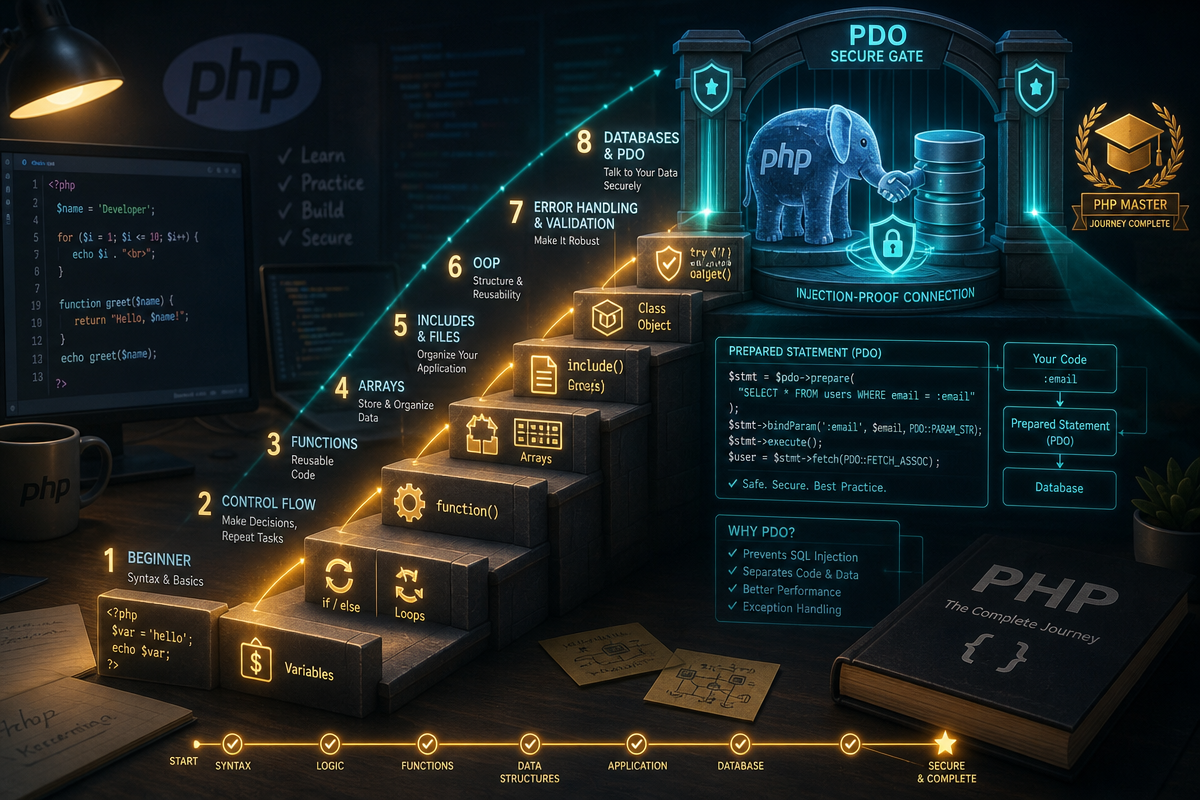
By the end of this roadmap, you’ll understand what PHP actually does, know the five genuinely free ways to learn it, have written and run PHP in your browser and from the command line, and understand how PHP handles forms, databases, and basic security – the foundations for a first real project.
Is PHP worth learning in 2026?
Here’s the uncomfortable truth for language purists: as of September 2026, PHP is used by 70.2% of websites whose server-side language is known, according to W3Techs. That share has drifted down slightly over the year – it sat at 71.8% earlier in 2026 – but no other server-side language comes close; Ruby, JavaScript, Java, and ASP.NET each trail at under 7%. Facebook, Wikipedia, and WordPress.org all lean on it. If you want your code to power real, high-traffic sites – not just tutorial projects – PHP remains one of the most pragmatic first languages you can pick.
Step 1: Understand what PHP actually does
PHP is a server-side scripting language: the server processes the PHP code and sends only the resulting HTML to the browser. That’s why, no matter how much PHP powers a page, visitors never see a line of it – they only ever see HTML.
This distinction trips up a lot of beginners coming from JavaScript, where code runs in the browser and is visible via “View Source.” PHP works the other way round. The script runs first, on the server, and by the time the page reaches you, all the PHP has already been converted into plain HTML. This is also why PHP is so tightly bound to WordPress: post and page content lives in a MySQL database, and PHP is the layer that queries that database and assembles the HTML page you actually see. WordPress’s core is written in PHP, though a finished site also relies on HTML, CSS, and JavaScript for layout and interactivity – PHP handles the server-side logic, not everything you see on screen.
There’s a neat historical aside here. PHP wasn’t designed as a grand language project. Rasmus Lerdorf created it in 1994 as a set of scripts to track visits to his own online résumé, and he called it “Personal Home Page Tools.” It was a solution to a small, personal problem, not a masterplan for the web. That accidental, patch-it-as-you-go origin explains a lot about PHP today: it’s unglamorous, occasionally inconsistent, and enormously practical – qualities that have kept it running the web for three decades while flashier languages have come and gone.
Why this matters: understanding the server/browser split up front saves you hours of confused debugging later, when you inevitably wonder why your PHP code “disappeared” from the page source.
Step 2: Pick a free learning route
You learn PHP free by combining a hands-on interactive tutorial with the official manual as a reference, then building small real projects as you go. Five genuinely free routes cover almost everyone, and you don’t need to pick just one.
- YouTube tutorials. Search “PHP for beginners” and you’ll find multi-hour walkthroughs that cover variables, loops, and functions with someone talking you through their reasoning in real time. Good for visual learners who want to see a working environment before building their own.
- Free online courses. Codecademy and Laracasts both offer free PHP tracks with interactive code editors built into the browser. Laracasts in particular is worth bookmarking once you’re ready to explore Laravel, PHP’s most popular framework.
- The official PHP manual. It’s dense, but it’s also the single most accurate source for how any function actually behaves – and every professional PHP developer still uses it daily.
- Free books, such as PHP Apprentice, which walk through concepts in a structured order rather than the scattergun approach of searching random blog posts.
- Interactive tutorials, like W3Schools and learn-php.org, which let you write and run PHP directly in the page – no installation required.
That last point matters more than it seems. You can start practising PHP directly in your browser without buying a course or configuring a server. Every tool you need to get started is free, which removes the single biggest barrier that stops beginners before they write their first line of code.
Step 3: Write and run your first PHP script (in the browser)
Here’s a step-by-step first script: a PHP echo statement embedded directly in an HTML page.
3a. Open a free interactive PHP editor. Go to W3Schools’ “Try It Yourself” PHP editor or learn-php.org. Both run PHP server-side and show you the rendered output instantly – no download needed.
3b. Write this code:
<!DOCTYPE html>
<html>
<body>

<h1>My first PHP page</h1>

<?php
  echo "<p>Hello World</p>";
?>

</body>
</html>
3c. Run it. Click “Run” or “Execute” in the editor. You should see:
My first PHP page

Hello World
The <h1> heading came straight from your HTML. The “Hello World” paragraph came from your PHP echo statement – but if you view the page’s source in a browser, you’ll only ever see <p>Hello World</p>, never the <?php ?> block that generated it. That’s server-side processing in action.
Common mistake: forgetting the semicolon at the end of a PHP statement. If you see a parse error like unexpected end of file or syntax error, unexpected token, check that every line inside your <?php ?> tags ends with ;. It’s the single most common typo beginners make, and PHP won’t run the script until it’s fixed.
3d. Experiment with a variable:
<?php
  $name = "your name here";
  echo "<p>Hello, $name!</p>";
?>
If you see your name printed back in the output, you’ve just used your first PHP variable.
Step 4: Install PHP locally and run scripts from the command line
Browser editors are great for learning syntax, but real projects run on your own machine or a server – and you’ll eventually need to run PHP from a terminal. This is the point where “learning PHP” starts to feel like real development.
4a. Install PHP. On macOS, run brew install php. On Windows, download the installer from windows.php.net or use XAMPP, which bundles PHP, MySQL, and Apache together. On Linux, use your package manager, e.g. sudo apt install php.
4b. Verify the install:
php -v
You should see version output like PHP 8.3.x. If you get command not found, PHP isn’t on your system PATH – reopen your terminal or check your install location.
4c. Run a script from the command line. Save this as hello.php:
<?php
  echo "Hello from the command line!\n";
?>
Then run:
php hello.php
Why this matters: command-line PHP is how automated tasks, cron jobs, and Composer (PHP’s package manager) actually work. It’s also how you’ll eventually deploy and debug real applications, rather than relying on a browser sandbox.
Step 5: Handle forms with $_POST and $_GET
Forms are how PHP moves from “displays text” to “does something with user input.” Save this as form.php:
<!DOCTYPE html>
<html>
<body>

<form method="post" action="form.php">
  Name: <input type="text" name="username">
  <input type="submit">
</form>

<?php
if ($_SERVER["REQUEST_METHOD"] == "POST") {
  $name = htmlspecialchars($_POST["username"]);
  echo "<p>Hello, $name!</p>";
}
?>

</body>
</html>
Submitting the form sends the input back to the same page, where PHP reads it via $_POST and echoes a greeting.
Security basics, not optional: always run user input through htmlspecialchars() before echoing it back into HTML. Skipping this step is how sites end up vulnerable to cross-site scripting (XSS), where an attacker submits <script> tags instead of a name. Never trust $_POST or $_GET data directly – treat every form submission as potentially hostile until you’ve sanitised it.
Step 6: Connect to a database safely
Most real PHP applications – including WordPress – store data in MySQL. Here’s the safe pattern for querying it:
<?php
$conn = new mysqli("localhost", "db_user", "db_password", "my_database");

if ($conn->connect_error) {
  die("Connection failed: " . $conn->connect_error);
}

$stmt = $conn->prepare("SELECT name FROM users WHERE id = ?");
$stmt->bind_param("i", $user_id);
$stmt->execute();
$result = $stmt->get_result();
?>
Common mistake: building queries by concatenating strings, e.g. "SELECT * FROM users WHERE id = " . $user_id. This is how SQL injection attacks happen – a malicious value in $user_id can rewrite your entire query. The prepared statement above (prepare() + bind_param()) separates the query structure from the data, so user input can never be interpreted as SQL code. This applies equally if you’re customising WordPress plugin or theme code: WordPress provides $wpdb->prepare() for exactly this reason, and it’s not optional when handling user input.
Step 7: Debug common errors
If you see a blank white page: PHP errors are likely being logged, not displayed. Add this to the top of your script while developing (never in production):
<?php
ini_set('display_errors', 1);
error_reporting(E_ALL);
?>
If you see Undefined variable warnings: you’re referencing a variable before it’s been set – often a typo in the variable name, or a form field that wasn’t submitted.
If you see Call to undefined function: check for a typo, or that the required PHP extension (e.g. mysqli) is enabled in your php.ini.
Step 8: Build a small project – a guestbook
Combine what you’ve learned: a form that saves messages to a file, and displays them below.
<?php
if ($_SERVER["REQUEST_METHOD"] == "POST") {
  $entry = htmlspecialchars($_POST["message"]) . "\n";
  file_put_contents("guestbook.txt", $entry, FILE_APPEND);
}
$messages = file_exists("guestbook.txt") ? file("guestbook.txt") : [];
?>

<form method="post">
  <input type="text" name="message">
  <input type="submit" value="Sign guestbook">
</form>

<?php foreach ($messages as $msg): ?>
  <p><?= htmlspecialchars($msg) ?></p>
<?php endforeach; ?>
This ties together forms, PHP logic, and output – a genuine, if small, working application. Swap the file for a database table using the pattern from Step 6 and you’ve got the shape of most real PHP apps.
The nuance most beginners miss: PHP is easy to start, but the ecosystem has moved on
PHP is often called one of the simpler languages to pick up, and that reputation is earned. It embeds directly into HTML, so you don’t need to learn a separate templating system before you can display anything. It also comes with a huge library of built-in functions, so common tasks – string handling, date formatting, form processing – rarely require writing logic from scratch.
But there’s a nuance worth flagging before you build anything real: PHP’s overall usage share has been slowly declining in recent years, even as its footprint on existing sites remains massive. That’s not a contradiction – it means the language is mature and stable rather than growing, which is actually reassuring for a beginner. You’re not betting on a fad; you’re learning the plumbing behind a huge share of the existing web. WordPress.org’s own requirements page recommends running PHP 8.3 or greater as the baseline for security and performance, with newer WordPress core versions (6.9 and later) tested against PHP 8.4 and 8.5 too. If you inherit or maintain a site running PHP 8.1 or older, treat that as a warning sign rather than a technical footnote – those versions have reached, or are close to reaching, end of life and can leave a site exposed to unpatched security vulnerabilities.
This is also where PHP’s beginner-friendliness has a limit. It’s the ideal first language for understanding how the server-side web works, but if you’re weighing where to go after PHP, it’s worth knowing that strongly-typed languages like TypeScript catch a different category of bugs before your code ever runs – our guide to TypeScript for beginners is a natural next step once you’re comfortable with PHP’s looser style.
So, is PHP worth learning in 2026? Given that it still runs over 70% of the web’s known server-side infrastructure, that every tool needed to learn it is free, and that its beginner-friendly syntax gets you writing real, working code within minutes rather than days – yes. It’s not the newest language, and it won’t be the last one you learn. But as a first language that teaches you how the server-side web actually works, while running on real infrastructure you’ll likely encounter in a job or a client project, it’s hard to beat.
Next Steps
Once you’re comfortable with the steps above, move on to:
- A framework like Laravel – once core PHP feels natural, Laravel adds structure, routing, and conventions used across professional codebases.
- WordPress theme and plugin development – a practical way to apply PHP skills to the platform where PHP is used most, using
$wpdband the WordPress hook system rather than raw file handling. - Composer and package management – how professional PHP projects pull in and manage third-party libraries.
If you’re building something beyond a learning project – a client site, a business tool, or a WordPress build that needs to be secure and maintainable – it’s worth bringing in professional help rather than debugging production code solo. Get in touch with our team for development support.
Frequently Asked Questions
Q: Is it really possible to learn PHP for free?
A: Yes. Interactive editors like W3Schools and learn-php.org let you write and run PHP directly in the browser, and free resources like Codecademy, Laracasts, the official PHP manual, and books such as PHP Apprentice cover everything from basics to advanced concepts.
Q: Do I need to know PHP to use WordPress?
A: Not to run a basic WordPress site, since the platform handles PHP execution for you. But PHP knowledge becomes essential once you want to customise themes, build plugins, or troubleshoot errors, since WordPress’s core is built in PHP.
Q: Which PHP version should my website be running?
A: WordPress.org recommends PHP 8.3 or greater as of 2026, with 8.4 or 8.5 suitable for sites on WordPress 6.9+. PHP 8.1 and older are end of life or close to it, and no longer receive full security updates.
Q: How do I keep PHP forms and database code secure?
A: Always sanitise user input with htmlspecialchars() before displaying it, and always use prepared statements (bind_param() in mysqli, or $wpdb->prepare() in WordPress) instead of building SQL queries by concatenating strings.
Source: https://www.dreamhost.com/blog/learn-php/
This article was researched and written with AI assistance, then reviewed for accuracy and quality. Kev Parker uses AI tools to help produce content faster while maintaining editorial standards.
Need help with your web project?
From one-day launches to full-scale builds, DRS Web Development delivers modern, fast websites.