

Last updated: July 11, 2026

Image: eLearnCourses
By the end of this guide, you will be able to write a PHP script that connects to a MySQL database, runs parameterised queries, handles a real HTML form submission, and returns data safely – without a single SQL injection vulnerability in sight. That is the concrete payoff. Whether you are starting from scratch or you have written a few procedural scripts and keep hearing that you should use PDO, this article walks you through the full journey, step by step.
Here is the bold claim upfront: PHP is not a dying language. It has not been dying for the last decade, despite what you might read on developer forums. According to W3Techs, WordPress alone powers approximately 42% of all websites globally as of 2026 – and WordPress is built on PHP. If you are searching for a PHP tutorial beginners 2026 guide that actually reflects how the language is used in professional work, you are in the right place – and what you learn here still gets developers hired.
Prerequisites

Image: eLearnCourses
Before writing a single line of PHP, make sure you have the following in place:
- XAMPP installed – a free bundle that includes Apache, MySQL (MariaDB), PHP, and Perl in one installer. It runs on Windows, macOS, and Linux.
- A code editor – VS Code is recommended for PHP work.
- Basic HTML knowledge – you should understand what a
<form>and<input>tag do. - No PHP experience required – though familiarity with variables and loops in any language will help you move faster.
PHP in 2026: What You Are Actually Learning
PHP is a server-side scripting language, and that distinction matters more than it sounds. When a visitor loads a page on your site, PHP runs on the web server – Apache or Nginx – generates HTML, and sends that HTML to the browser. The browser never sees your PHP source code. Your database credentials, your business logic, your API keys – all of it stays on the server. That is a genuine security property, not a marketing claim.
Rasmus Lerdorf created PHP in 1994 as a set of Perl scripts to track visits to his online résumé. It has since grown into a language that officially stands for the recursive acronym “PHP: Hypertext Preprocessor.” It is open-source, free to use, and has been substantially modernised in the PHP 8.x releases – union types, named arguments, enums, fibers for async-style code, and a JIT compiler. If your mental model of PHP is rooted in the PHP 5 era, you are thinking of a different language.
Other languages compete, and Top Python Frameworks for Web Development in 2026 gives a fair comparison if you are weighing your options – but PHP’s installed base is enormous, and it is not going anywhere.
Step 1: Install XAMPP and Run Your First Script
Download XAMPP from the official Apache Friends website and run the installer with default settings. Once installed, open the XAMPP Control Panel and start Apache and MySQL.
Navigate to your htdocs folder – typically C:\xampp\htdocs on Windows or /Applications/XAMPP/htdocs on macOS. Create a file called hello.php:
<?php
echo "Hello, World!";
?>
Open your browser and go to http://localhost/hello.php. You should see:
Hello, World!
If you see the raw PHP code instead of output, Apache is not running, or you placed the file outside
htdocs. Check the XAMPP Control Panel – both green lights need to be on. PHP files must be served through Apache; you cannot open them directly in the browser withfile://. That is one of the most common mistakes beginners make, and it causes people to think PHP is broken when it is not.
Step 2: Variables, Conditionals, and Loops
PHP variables begin with a $ sign and do not require type declarations.
<?php
$name    = "Ada";
$age     = 30;
$colours = ["red", "green", "blue"];

if ($age >= 18) {
    echo $name . " is an adult.<br>";
}

foreach ($colours as $colour) {
    echo $colour . "<br>";
}
?>
Save this as variables.php and open http://localhost/variables.php. Expected output:
Ada is an adult.
red
green
blue
The . operator concatenates strings. The foreach loop iterates over arrays. Each value appears on its own line because of the <br> tag.
If you see a blank page, PHP is silently swallowing a syntax error. Open your
php.inifile, setdisplay_errors = Onanderror_reporting = E_ALL, then restart Apache from the XAMPP Control Panel.
The Best PHP Tutorial for Beginners in 2026 Covers PDO – Here Is Why
Most beginner tutorials skip the important part. They show you how to connect to MySQL using mysqli_query() with variables dropped directly into SQL strings – and then they leave you there. The problem is that this approach opens the door to SQL injection: one of the most common, most damaging, and most preventable web vulnerabilities.
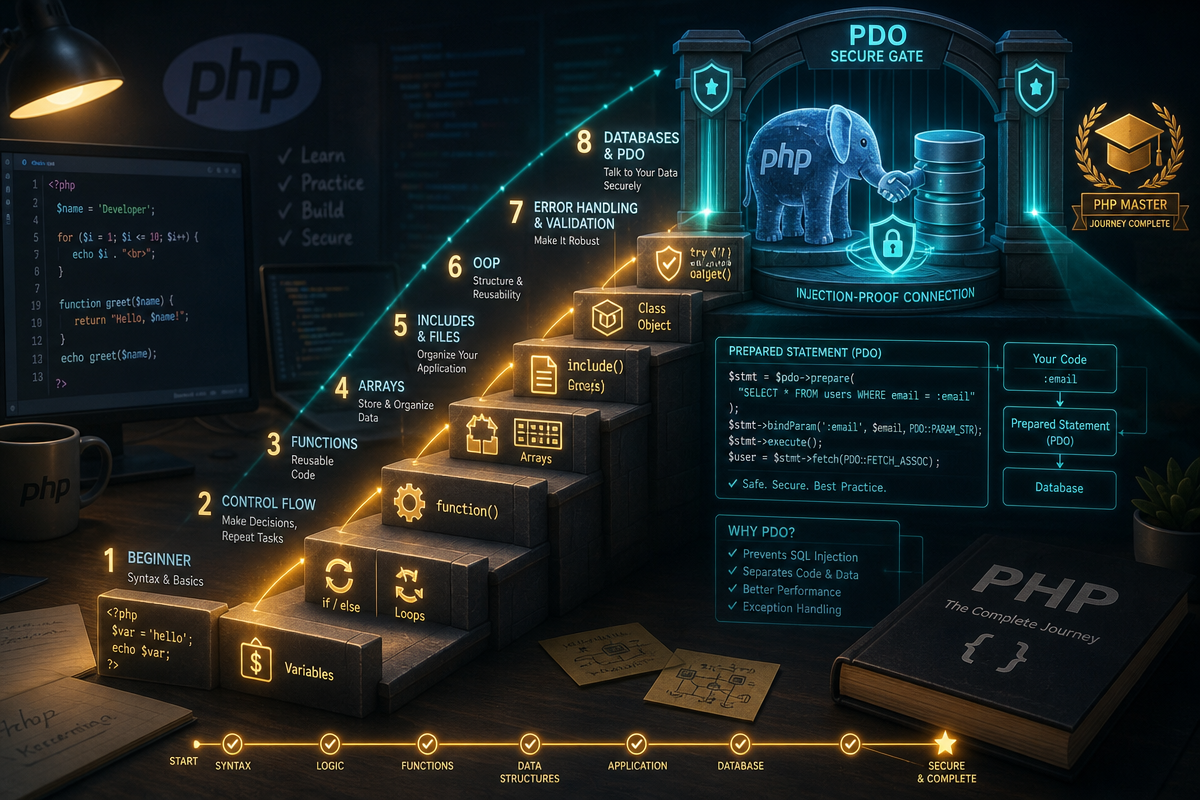
The modern answer is PDO – PHP Data Objects. PDO is a database abstraction layer bundled with PHP. It supports prepared statements, which separate SQL structure from user-supplied data. The database engine never confuses your data for SQL commands.
Compare these two approaches side by side:
Before (vulnerable):
$username = $_POST['username'];
$result = mysqli_query($conn, "SELECT * FROM users WHERE username = '$username'");
After (safe with PDO):
$stmt = $pdo->prepare("SELECT * FROM users WHERE username = :username");
$stmt->execute([':username' => $_POST['username']]);
In the first version, a malicious user could submit ' OR '1'='1 as their username and retrieve every row in the table. In the second version, the input is bound as a named parameter – the database treats it as data, not as SQL. That single structural change eliminates an entire class of attack. It is not optional; it is the baseline.
Step 3: Connect to MySQL with PDO
Open phpMyAdmin at http://localhost/phpmyadmin and create a database called myapp. Run this SQL to create a test table:
CREATE TABLE users (
    id INT AUTO_INCREMENT PRIMARY KEY,
    username VARCHAR(50) NOT NULL,
    email VARCHAR(100) NOT NULL
);
Now create db.php in your htdocs folder:
<?php
$host    = '127.0.0.1';
$db      = 'myapp';
$user    = 'root';
$pass    = '';
$charset = 'utf8mb4';

$dsn     = "mysql:host=$host;dbname=$db;charset=$charset";
$options = [
    PDO::ATTR_ERRMODE            => PDO::ERRMODE_EXCEPTION,
    PDO::ATTR_DEFAULT_FETCH_MODE => PDO::FETCH_ASSOC,
    PDO::ATTR_EMULATE_PREPARES   => false,
];

try {
    $pdo = new PDO($dsn, $user, $pass, $options);
} catch (\PDOException $e) {
    throw new \PDOException($e->getMessage(), (int) $e->getCode());
}
?>
ATTR_ERRMODE => ERRMODE_EXCEPTION makes PDO throw an exception on errors rather than silently failing. ATTR_EMULATE_PREPARES => false forces the driver to use real prepared statements rather than simulating them.
Common mistake: Leaving
ATTR_EMULATE_PREPARESat its default value oftruemeans PDO simulates prepared statements in PHP rather than at the database level. This does not fully protect against injection on older MySQL versions.
Test the connection before going further. Create test_connection.php:
<?php
require 'db.php';
echo "Connected successfully.";
?>
Open http://localhost/test_connection.php. Expected output:
Connected successfully.
If you see an error like
SQLSTATE[HY000] [1045] Access denied, your MySQL username or password indb.phpis wrong. XAMPP’s default MySQL user isrootwith an empty password. If you have changed it, update$userand$passto match.
Step 4: Insert and Retrieve Data Safely
Include your connection file and run parameterised queries:
<?php
require 'db.php';

// Insert a new user
$stmt = $pdo->prepare("INSERT INTO users (username, email) VALUES (:username, :email)");
$stmt->execute([
    ':username' => 'alice',
    ':email'    => 'alice@example.com',
]);

// Retrieve that user
$stmt = $pdo->prepare("SELECT * FROM users WHERE username = :username");
$stmt->execute([':username' => 'alice']);
$user = $stmt->fetch();

echo $user['email'];
?>
Expected output:
alice@example.com
Each call to prepare() sends the SQL template to the database server. Each call to execute() sends the bound values separately. The database engine never merges them into a single string – injection is structurally impossible rather than just unlikely.
Step 5: Handle a Real HTML Form
Static data is useful for testing, but real applications take input from users. Create register.php:
<?php
require 'db.php';

$errors  = [];
$success = false;

if ($_SERVER['REQUEST_METHOD'] === 'POST') {
    $username = trim($_POST['username'] ?? '');
    $email    = trim($_POST['email'] ?? '');

    if ($username === '') {
        $errors[] = 'Username is required.';
    } elseif (strlen($username) > 50) {
        $errors[] = 'Username must be 50 characters or fewer.';
    }

    if ($email === '' || !filter_var($email, FILTER_VALIDATE_EMAIL)) {
        $errors[] = 'A valid email address is required.';
    }

    if (empty($errors)) {
        $stmt = $pdo->prepare("INSERT INTO users (username, email) VALUES (:username, :email)");
        $stmt->execute([':username' => $username, ':email' => $email]);
        $success = true;
    }
}
?>
<!DOCTYPE html>
<html lang="en">
<head><meta charset="UTF-8"><title>Register</title></head>
<body>
    <?php if ($success): ?>
        <p>User registered successfully.</p>
    <?php endif; ?>
    <?php foreach ($errors as $error): ?>
        <p style="colour:red;"><?= htmlspecialchars($error) ?></p>
    <?php endforeach; ?>
    <form method="post">
        <label>Username: <input type="text" name="username"></label><br>
        <label>Email: <input type="email" name="email"></label><br>
        <input type="submit" value="Register">
    </form>
</body>
</html>
Open http://localhost/register.php. Submit the form with a valid username and email – you should see “User registered successfully.” Submit it with a blank username – you should see the validation error in red.
Several things are worth noting here. $_SERVER['REQUEST_METHOD'] === 'POST' checks that the form was actually submitted before processing anything. filter_var($email, FILTER_VALIDATE_EMAIL) is PHP’s built-in email validator – it is not perfect for all edge cases, but it catches the vast majority of input errors. htmlspecialchars() around any output ensures that even if malicious HTML somehow entered your data, it is printed as text rather than executed. That is output escaping, and it prevents a different class of attack called XSS (Cross-Site Scripting).
If form submissions seem to do nothing, check that your
<form>tag includesmethod="post". Without it, the browser sends aGETrequest,$_SERVER['REQUEST_METHOD']will beGET, and the processing block is skipped entirely.
Safe Error Handling: Local vs Production
The PDO setup above throws exceptions on error – which is exactly what you want during development. But there is an important difference between how you should handle errors locally and in production.
During development, display errors directly so you can see them immediately:
// At the top of db.php or a bootstrap file
ini_set('display_errors', 1);
error_reporting(E_ALL);
In production, never show raw exception output to users. A stack trace revealing your database table names and query structure is genuinely useful to an attacker. Instead, catch the exception, log it privately, and show the user a generic message:
try {
    $pdo = new PDO($dsn, $user, $pass, $options);
} catch (\PDOException $e) {
    error_log($e->getMessage()); // writes to your server's error log
    http_response_code(500);
    exit('A database error occurred. Please try again later.');
}
error_log() writes to your web server’s error log – accessible from your hosting control panel or via SSH – without ever exposing anything to the browser.
Nuances Most Tutorials Miss
PDO is not the end of the road – it is the foundation. Laravel’s Eloquent ORM sits on top of PDO and abstracts queries further with an expressive, readable syntax. Once you are comfortable with raw PDO, Daily Laravel Practice & Coding Challenges | LaraStreak is worth bookmarking as a way to build that next layer of skill through structured daily practice.
The underlying principle behind all of this is layered separation: PHP running on the server never exposes your logic to the client. PDO running inside PHP never exposes your data structure to your SQL engine. Output escaping ensures that data you write to the browser is never executed as code. Layers of separation – one after another – are what make secure applications possible.
Next Steps
Once you are comfortable with PDO and basic PHP syntax, the natural progression runs through three areas: learn a framework (Laravel is the dominant choice, Symfony is the other major option), study authentication (password hashing with password_hash() and password_verify() is the immediate next security topic), and deploy a real project to a live server so you see how production environments differ from XAMPP.
If you are curious about how the broader development landscape is shifting – including on the JavaScript side – ES2026 (17th Edition) Is Here: 5 Features You Need to Know gives a useful picture of where frontend languages are heading in parallel.
If you are working on a professional project and need experienced PHP development support, the team at drs-web.co.uk/contact is available for custom work.
Frequently Asked Questions
Q: Is PHP worth learning in 2026?
A: Yes. WordPress alone powers roughly 42% of all websites globally as of 2026 (W3Techs), and WordPress is built on PHP. The language continues to be modernised actively and remains central to a large share of web development roles.
Q: What is the difference between mysqli and PDO in PHP?
A: Both connect PHP to MySQL, but PDO supports multiple database drivers and makes prepared statements cleaner to write. PDO is the preferred approach for new projects because it is more portable and its API naturally encourages safer, parameterised query patterns.
Q: What is a prepared statement and why does it prevent SQL injection?
A: A prepared statement sends the SQL template to the database separately from the user-supplied values. The database engine processes them independently, so user input can never be interpreted as SQL commands – this eliminates SQL injection at a structural level rather than relying on sanitisation.
Q: Do I need XAMPP to learn PHP?
A: XAMPP is the simplest starting point for Windows, macOS, and Linux users because it bundles Apache, MySQL, and PHP in a single installer with no configuration required. Alternatives include Laragon on Windows and Laravel Herd on macOS, but XAMPP remains the most beginner-friendly option.
Q: What is the best PHP framework to learn after the basics?
A: Laravel is the most widely used and in-demand PHP framework in 2026, with a large ecosystem, excellent documentation, and strong job market presence. Symfony is the other major option, particularly in enterprise environments.
Source: https://elearncourses.com/php-tutorial/
This article was researched and written with AI assistance, then reviewed for accuracy and quality. Kev Parker uses AI tools to help produce content faster while maintaining editorial standards.
Need help with your web project?
From one-day launches to full-scale builds, DRS Web Development delivers modern, fast websites.