




Last updated: April 8, 2026
How many times has perfectly working code on your laptop broken everything the moment it landed in production? That scenario – the classic “works on my machine” problem – is precisely what a continuous integration CI pipeline is designed to eliminate. CI is the practice of automatically building and testing every code push against a shared repository, catching regressions before they ever touch the main branch. Adopt it, and your team stops playing detective after deployments and starts catching problems at the source.
Five things make a CI pipeline genuinely useful. Get them right and you will transform chaotic, blame-heavy release cycles into predictable, confidence-inspiring deployments.
1. The Continuous Integration CI Pipeline Architecture
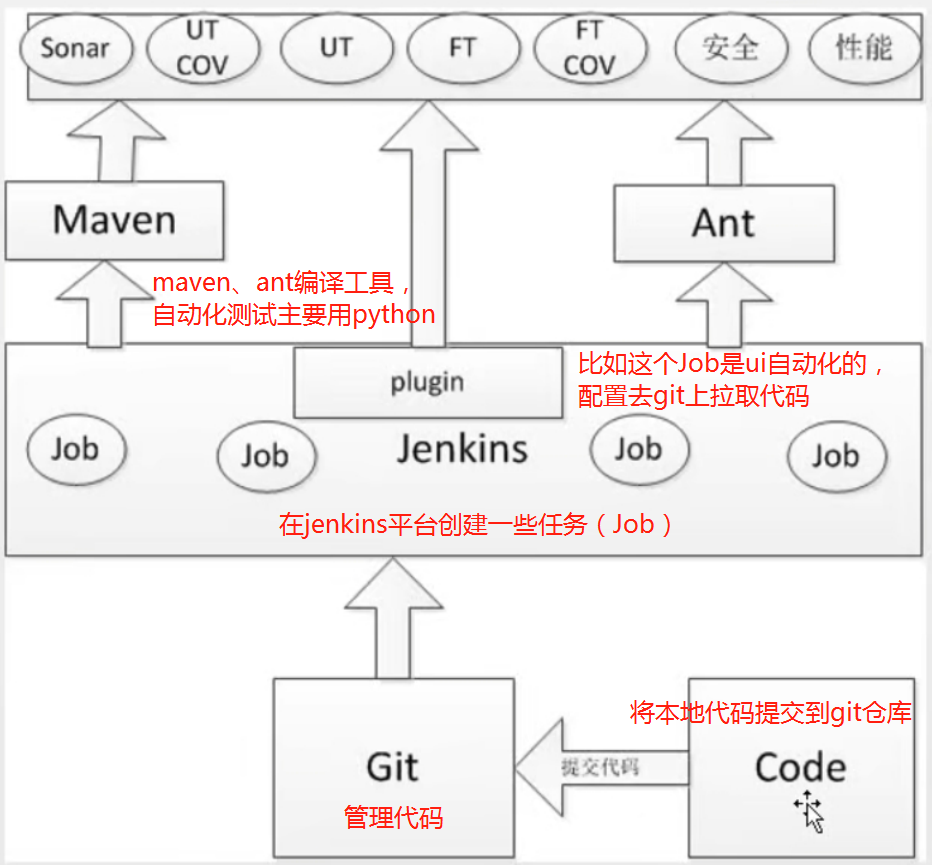
Image: 知乎 (Zhihu)
A CI pipeline is a sequence of automated stages that runs every time a developer pushes code. The typical architecture: checkout the repository, install dependencies, build the project, run unit tests, run integration tests, then publish build artefacts. Each stage passes its output to the next. One failure stops the chain.
That matters because the pipeline runs in a clean, reproducible environment – not on anyone’s laptop. It does not matter that you have a slightly different version of Node installed, or that your colleague has a cached build from three weeks ago. The CI server starts fresh every time, with a defined OS, runtime version, and set of dependencies. Before CI: “it works on my machine.” After CI: “it works, full stop.”
Whether you’re deploying a custom application or a content-managed site on WordPress, the pipeline architecture is identical – reproducible environments are the foundation.
2. Quality Gates at the Merge Boundary
CI catches bugs at exactly the right moment – when a developer requests to merge their code, before anything reaches the main branch. Automated quality gates block pull requests that fail unit tests, drop below a coverage threshold, or introduce known security vulnerabilities. The pull request itself becomes a quality checkpoint.
What does that look like in practice? Test results and coverage reports publish directly into the PR interface. A reviewer can see at a glance whether the branch is green, what percentage of the code is covered, and whether any new dependencies carry CVEs (Common Vulnerabilities and Exposures). No digging through CI logs. No guesswork.
You might think this is overkill for small teams – “we review the code carefully, we don’t need automated gates.” But automated checks catch entire categories of mistake that human reviewers reliably miss: subtle operator errors like using != where is not was intended, off-by-one errors in untouched paths, coverage drops caused by deleted tests. Humans excel at architecture review. Machines excel at consistency.
3. Caching Strategies That Cut Build Times
Here is where many teams leave significant time on the table. A naive CI run reinstalls every dependency from scratch on every build. For a project with 400 npm packages or a Java project pulling from Maven Central, that alone can cost 15 minutes per run.
Cache the dependency layer – npm modules, Maven packages, pip wheels – and that same install stage drops to under a minute. Teams regularly report cutting total pipeline duration from 20 minutes to 5 through caching alone. [citation needed] That is not a small optimisation; it is the difference between developers waiting for feedback and developers context-switching, losing focus, and reintroducing the same bug twice.
The implementation is straightforward on most CI platforms: cache the dependency directory keyed on a hash of your lockfile. When the lockfile changes, the cache invalidates and dependencies reinstall fresh. When it has not changed – which is most builds – the cache hits and you move straight into compilation.
4. Parallel Test Execution for Faster Feedback
Not all tests are equal. Unit tests run in milliseconds; integration tests spin up real databases, real HTTP servers, and real file systems. Mixing them together in a single sequential stage wastes everyone’s time.
A smarter pattern: run unit tests on every push, integration tests only on pull requests. Unit tests give near-instant feedback on logic errors. Integration tests run where they count – at the merge gate, where a slower but more thorough check is warranted. Parallelise within each stage too: split your test suite across multiple runners and let them work simultaneously. The feedback loop stays fast for the developer iterating locally, while the full suite still runs before anything merges.
5. Node.js CI Pitfalls Worth Knowing
Node.js introduces a subtle problem that catches teams off-guard. Two machines with identical package.json files can produce completely different node_modules trees depending on npm version, Node runtime version, and installation order. The fix: always commit a lockfile (package-lock.json or yarn.lock) and use npm ci rather than npm install in your pipeline. The former installs exactly what the lockfile specifies and fails loudly on any mismatch.
This is also why pinning your Node version in CI matters. A pipeline running Node 20 today and Node 22 next month is not testing the same thing. [citation needed] Use a .nvmrc or .node-version file and configure your CI environment to respect it. If you are running CI builds inside Docker containers, you get this isolation automatically – the base image pins the runtime and eliminates the variable.
The through-line across all five – architecture, quality gates, caching, parallelism, runtime pinning – is reproducibility. CI works because it removes the variables. Same environment, same tools, same process, every single time. That is what turns “it broke in production” from a weekly occurrence into a rare event worth investigating.
Start small: get a basic checkout-install-test pipeline running on your next pull request. Add caching. Add coverage reporting. Build the habit before you build the sophistication. The teams that struggle with CI are not the ones who started with too little – they are the ones who never started at all.
Frequently Asked Questions
Q: What is a continuous integration CI pipeline?
A: A CI pipeline is an automated sequence of stages – checkout, install dependencies, build, test, publish – that runs every time a developer pushes code to a shared repository. It catches bugs and regressions before they reach the main branch, ensuring code is always in a deployable state.
Q: How does CI eliminate “works on my machine” problems?
A: CI runs builds and tests in a clean, reproducible server environment rather than on individual developer machines. Every run starts fresh with a defined OS version, runtime, and dependency set, so local configuration differences cannot mask failures.
Q: How much can caching reduce CI build times?
A: Caching dependency directories (npm modules, Maven packages, pip wheels) between runs can reduce build times from 20 minutes to around 5 minutes. The cache is keyed on a lockfile hash and invalidates only when dependencies actually change.
Q: What quality gates should a CI pipeline enforce on pull requests?
A: At minimum: passing unit and integration tests, a minimum code coverage threshold, and a dependency vulnerability scan. These run automatically on every pull request, blocking merges that would reduce quality or introduce known security issues.
Q: Why does Node.js CI need special handling?
A: Identical package.json files can produce different node_modules trees across different npm versions, Node runtimes, or installation orders. Fix this by committing a lockfile and using npm ci rather than npm install – it installs exactly what the lockfile specifies and fails if there is any mismatch.
Source: https://www.zhihu.com/question/590296844
This article was researched and written with AI assistance, then reviewed for accuracy and quality. Nia Campbell uses AI tools to help produce content faster while maintaining editorial standards.
Need help with your web project?
From one-day launches to full-scale builds, DRS Web Development delivers modern, fast websites.