


Last updated: May 19, 2026
Picture the moment a client says, “We need users to log in, manage their profiles, and access personalised dashboards.” Three years ago, that sentence meant either a custom build from scratch or an expensive SaaS platform. Today, a WordPress developer reading those words might quietly think: I can ship that in a fortnight. That shift – from WordPress-as-blog-engine to WordPress-as-application-platform – is the practical reality of WordPress web app development in 2026, and how you approach it shapes everything from delivery time to long-term maintenance cost.
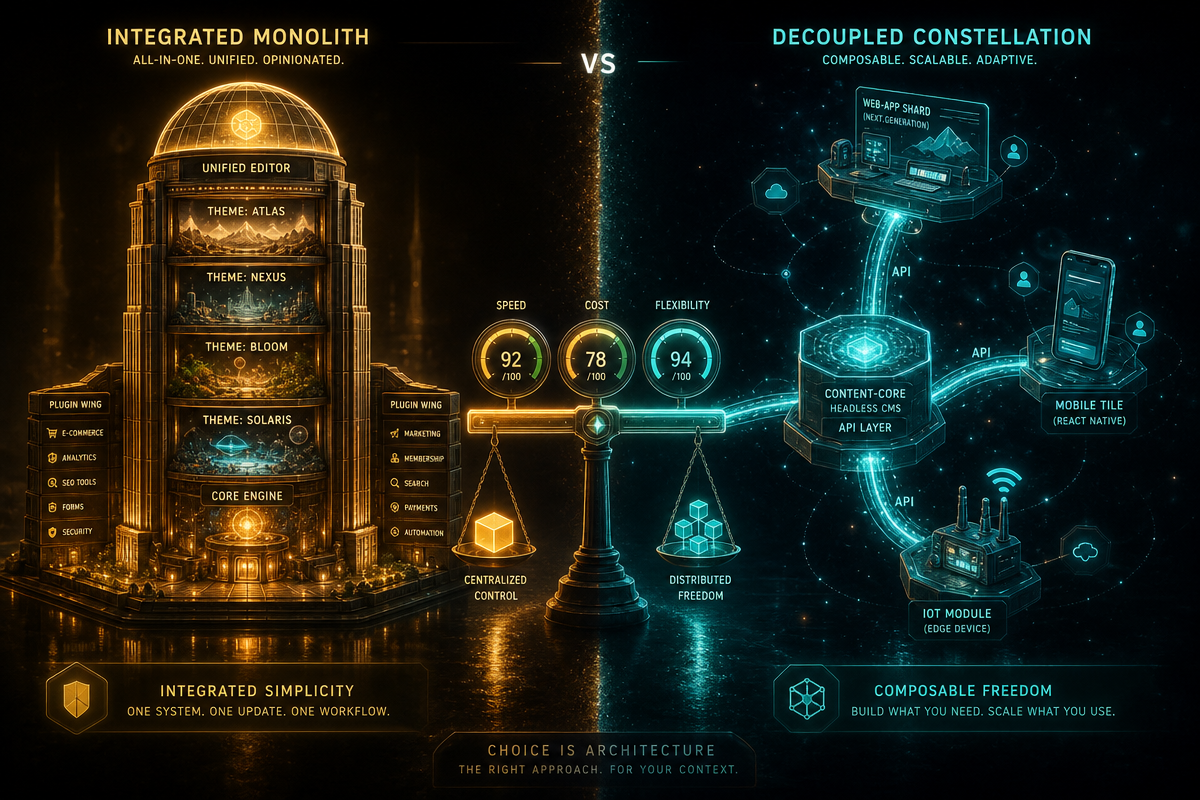
The core choice facing any developer or agency is this: do you build with a low-code, plugin-driven approach using themes and page builders, or do you go headless – decoupling WordPress as a backend API and pairing it with a modern JavaScript framework on the front? Both paths are legitimate. Neither is universally correct. What follows is an honest breakdown of each, so you can make the decision with open eyes.
The Case for Low-Code WordPress: Speed, Ecosystem, Ownership
Image: Hostinger
Low-code WordPress app development delivers working software faster than almost any alternative, and the ecosystem is its strongest argument. WordPress powers roughly 43% of the web [citation needed] not because developers have low standards, but because the tooling genuinely works.
Start with what you get for free. WordPress ships with a full user management system: registration, login, password reset, and role-based permissions. You do not build authentication – you configure it. For a membership site, a client portal, or a learning platform, that alone eliminates weeks of development. Layer on plugins like WooCommerce for commerce logic, LearnDash for course delivery, or Advanced Custom Fields (ACF) for complex data structures, and you have a content-driven application with a functioning admin interface before you have written a single line of custom code. ACF in particular deserves attention: it allows developers to define custom post types, taxonomies, and field groups that map neatly to business data models – think property listings, job boards, or product catalogues – without designing a custom database schema.
The analogy that fits here is flat-pack furniture. A bespoke cabinet maker can produce something extraordinary, but a well-assembled flat-pack piece from a quality supplier is in the room and functional on the same day. Low-code WordPress is the flat-pack: the joints are pre-engineered, the tolerances are tested at scale, and you are not reinventing joinery. For content-driven applications – directories, marketplaces, subscription platforms, e-learning tools – the plugin ecosystem is the application layer, not a workaround.
WordPress Multisite extends this further. A single installation can power multi-tenant platforms and white-labelled SaaS products, with shared infrastructure and per-site customisation. For agencies building client portals or franchise management tools, that is a genuine architectural feature, not a hack. Pair this with the fact that WordPress is open-source with no licensing fees, and the total cost of ownership undercuts most commercial alternatives significantly. If you are weighing up the ongoing WordPress design trends for 2026, the low-code path aligns naturally with most business-site requirements without demanding specialist front-end engineers.
The Case for Headless WordPress Web App Development
Headless WordPress treats the CMS purely as a data and content backend, exposing everything through an API – either the built-in REST API or GraphQL via the WPGraphQL plugin – and letting a separate JavaScript application handle all rendering and interaction. React and Vue are the dominant front-end choices here.
This approach is the right call when application behaviour, not content management, is the primary concern. Real-time data updates, complex client-side state, animations that require precise frame-rate control, or deep integration with third-party APIs – these are scenarios where a traditional WordPress theme becomes a constraint rather than a foundation. A React front end consuming WordPress data via GraphQL can deliver an application experience that is indistinguishable from a custom-built SPA (single-page application), while the content team retains the familiar WordPress admin interface they already know.
Performance is a genuine differentiator. A headless build typically renders to static files at build time (via frameworks like Next.js) or serves pre-rendered pages from an edge CDN, which eliminates PHP processing time from the critical path entirely. For applications where site speed directly affects conversion rates, this architectural separation pays measurable dividends. The trade-off is upfront complexity: you are now maintaining two distinct code environments, two deployment pipelines, and a team that needs competence in both WordPress and modern JavaScript.
The myth worth busting here is that headless WordPress is always the more “professional” choice. It is not. It is a more specialised choice – appropriate for teams with the bandwidth to manage the added complexity, and for applications where the benefits of a decoupled front end are genuinely required by the product spec.
WordPress Web App Development: Head-to-Head Trade-offs
The divergence between these two approaches comes down to three variables: team composition, application complexity, and time-to-market pressure.
Low-code WordPress favours smaller teams, faster delivery cycles, and applications where content management and business logic are tightly coupled. It carries a real risk: plugin sprawl. An application built on a dozen plugins from a dozen vendors creates a dependency web that becomes brittle over time. Version conflicts, abandoned plugins, and security surface area are genuine long-term concerns that structured low-code builds – where ACF and custom post types do the heavy lifting instead of stacking plugins – can mitigate. Accessibility and performance are also areas requiring deliberate attention; a plugin-heavy theme does not automatically produce WCAG-compliant or performant output.
Headless WordPress suits larger teams, longer delivery timelines, and applications where front-end experience is a competitive differentiator. The infrastructure cost is higher – you are running WordPress plus a Node.js rendering environment plus CDN configuration – but the architectural ceiling is higher too. The content model stays in WordPress; the application logic lives in JavaScript; and the two are decoupled enough that either can be replaced without rebuilding the whole system.
Which Approach Fits Your Project?
Choose the low-code path when: the application is content-driven, the team is primarily WordPress-fluent, the budget is constrained, and the delivery window is short. Membership platforms, directory sites, online stores, booking systems, and client portals all land here comfortably.
Choose headless when: the front-end experience is the product – not just a delivery mechanism – the team includes dedicated JavaScript engineers, and the application has real-time or highly interactive requirements that a PHP-rendered theme cannot serve without contortion. Enterprise marketing platforms, SaaS dashboards, and mobile-first web applications are the natural home for this approach.
There is no shame in the lower-complexity option. The right architecture is the one that ships, performs, and can be maintained by the people who own it. WordPress in 2026 is capable of both approaches. The decision is yours to make with clear data, not convention.
If you are planning a web application and want expert guidance on which approach suits your requirements, DRS Web Development builds custom websites and web applications for businesses of all sizes – from content-driven platforms to complex headless builds. Get in touch at drs-web.co.uk/contact for a free consultation.
Frequently Asked Questions
Q: Can WordPress really be used to build web applications, or is it just for blogs?
A: WordPress fully supports web application development in 2026. It provides built-in user authentication, REST API and GraphQL endpoints, custom post types for complex data structures, and Multisite for multi-tenant platforms – making it a capable backend for both content-driven apps and headless JavaScript front ends.
Q: What is the difference between a low-code WordPress app and a headless WordPress setup?
A: Low-code WordPress uses plugins, page builders, and themes to build the full application within WordPress itself. Headless WordPress uses WordPress solely as a content and data backend, exposing content via API to a separate JavaScript front end (typically React or Vue) that handles all rendering and user interaction.
Q: Does WordPress have a built-in authentication system for web apps?
A: Yes. WordPress ships with registration, login, password reset, and role-based permissions [citation needed] out of the box. Developers building membership sites, client portals, or subscription platforms can configure this system rather than building one from scratch.
Q: Is headless WordPress more performant than a standard WordPress theme?
A: Generally, yes. Headless setups using frameworks like Next.js can pre-render pages to static files served from a CDN, removing PHP processing time from page load entirely. However, well-optimised traditional WordPress sites can also achieve strong performance scores with proper caching and infrastructure configuration.
Q: What types of web applications are best suited to WordPress?
A: Content-driven applications benefit most from WordPress – membership sites, e-learning platforms, online directories, marketplaces, WooCommerce stores, and client portals all map well to WordPress’s CMS architecture. Applications requiring complex real-time interactions or highly custom front-end experiences may be better served by a headless approach.
Source: https://www.hostinger.com/ca/tutorials/building-web-apps-with-wordpress
This article was researched and written with AI assistance, then reviewed for accuracy and quality. Riya Shah uses AI tools to help produce content faster while maintaining editorial standards.
Need help with your web project?
From one-day launches to full-scale builds, DRS Web Development delivers modern, fast websites.