
Last updated: April 8, 2026
Imagine you have just been handed a brief: rebuild the company website so the marketing team can update content without touching code, and the same content needs to feed a mobile app, a digital kiosk, and a voice assistant. You open the existing WordPress installation and realise every layer – content, logic, and presentation – is bolted together. Change one thing, and three other things break. That is the moment headless web development stops being an abstract concept and starts being a genuine solution worth understanding.
What “Headless” Actually Means

Image: Stack Overflow
Headless simply means removing the front end. At its most literal, headless computing means running an application without a graphical user interface (GUI) – in a console or command-line environment rather than through a screen with buttons and windows. Most production servers are headless by default: you administer them over SSH, never touching a monitor. The “head” is the visual interface; remove it, and you have a headless system.
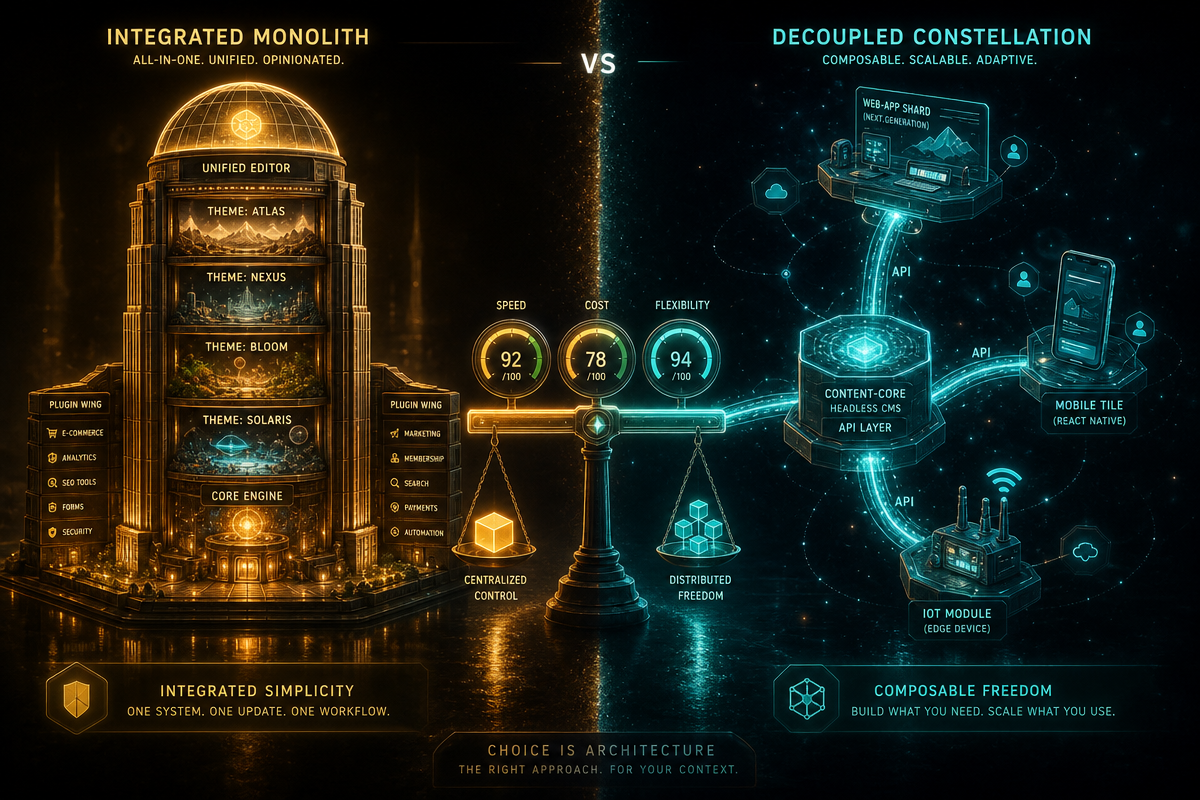
In web development, the same logic applies at a higher level. A headless CMS (Content Management System) stores and manages content but does not dictate how that content is displayed. The backend does its job – structured data, editorial workflows, media management – and exposes everything through an API (Application Programming Interface, essentially a standardised messenger between systems). The front end, built separately in React, Next.js, Astro, or whatever you choose, fetches that data and renders it however it likes.
One useful parallel: think of a restaurant kitchen versus a restaurant dining room. Traditional CMS architecture locks the kitchen and dining room together – the chef decides the menu, the plating, and the table layout. Headless separates them. The kitchen produces excellent food and hands it through a hatch; the dining room team can redesign the space, add a takeaway counter, or start delivering to homes, all without the chef changing a thing.
The Case for Headless: Freedom, Speed, and Scale
Headless architecture earns its reputation where flexibility and performance genuinely matter. The clearest wins: multi-channel publishing without duplication, front-end performance optimisation independent of CMS release cycles, and developer freedom to use modern tooling.
Take a media brand managing content for a website, a mobile app, and smart TV integration. A traditional CMS means either duplicating content across three systems or building fragile workarounds. Headless solves this cleanly – one content repository, three front ends, all consuming the same API. By 2026, headless CMS architecture has evolved beyond a single API serving JSON into what practitioners call a “Content Mesh” – an orchestrated layer pulling from distributed, specialised sources like separate product databases, localisation services, and third-party feeds. That is a meaningful shift for teams running complex content operations.
Headless commerce follows the same principle. Separate the frontend presentation layer from backend commerce functionality, and each layer can evolve independently. Your checkout logic, inventory management, and pricing engine sit in one place; your storefront, mobile app, and in-store kiosk consume them all. Seasonal redesigns become a front-end task that does not touch the payment system.
The term “headless” also has roots in enterprise automation. Tools like Eclipse – the Java development environment – have long supported headless operation, where a heavyweight application runs without its GUI for automated build-factory integration. Installing Eclipse plugins via command-line parameters rather than manual GUI clicks is the same principle: reproducible, scriptable, no human required. That lineage matters because it tells you headless is not a trend – it is an architectural pattern with decades of proven use.
The Case for Traditional (Coupled) CMS: Simplicity and Ecosystem
A coupled CMS – WordPress being the canonical example – remains the correct choice for many projects. The all-in-one approach is genuinely powerful: content management, theme system, plugin ecosystem, and hosting all work together with minimal configuration. For small teams, agencies building client sites quickly, or projects where a dedicated front-end developer is not available, the integrated stack wins on speed-to-launch and ease of maintenance.
The ecosystem argument is not trivial. WordPress alone powers a substantial portion of the web, and that scale means a vast library of plugins, themes, and community knowledge. Need SEO tooling, contact forms, or an e-commerce layer? Install a plugin. Done.
However, this ecosystem creates real headless compatibility problems worth naming honestly. Some WordPress plugins assume they control the frontend – SEO plugins, contact forms, WooCommerce – and they break or become irrelevant in a headless setup, requiring API-based alternatives. Accessibility tooling can be affected too; if you are working towards WCAG 2.1 compliance, you need to verify that your headless front end handles semantic HTML and ARIA attributes correctly rather than relying on plugin-generated markup. Similarly, digital accessibility requirements under the DOJ rule apply to your rendered output regardless of the underlying architecture – headless does not grant a compliance pass.
The honest summary: a traditional CMS reduces initial complexity at the cost of long-term flexibility.
Head-to-Head: Where the Trade-Offs Bite
Headless architecture is not a free upgrade. The flexibility comes with genuine costs.
First, infrastructure complexity increases. A traditional CMS deployment is one system; headless is at least two (backend API layer plus front-end deployment), often more when you factor in CDN configuration, build pipelines, and preview environments. Teams who have dealt with dependency issues – say, failed package installations during a Node.js or Python build – know that more moving parts means more failure points. Second, editorial experience suffers unless you invest in it. Real-time previewing in a headless setup requires deliberate engineering; it does not come for free. Third, the cost ceiling is higher – both in developer hours and in ongoing infrastructure.
A related concept worth distinguishing: “faceless” applications interact with users through non-visual channels like SMS or phone calls rather than through any kind of screen. A headless system still has a front end – just a decoupled one. A faceless system has no user-facing interface at all. Conflating the two leads to misaligned architecture decisions.
When to Choose Headless – and When Not To
Here is a direct recommendation, not a hedge: choose headless when you have multi-channel content delivery needs, a dedicated front-end developer on the team, and a project lifespan long enough to justify the initial investment. E-commerce brands, media publishers, and SaaS platforms with complex front-end requirements are natural fits.
Choose a traditional coupled CMS when you are building for a small business, working to a tight deadline, or handing the site to a non-technical client who needs to self-manage without developer involvement. The marketing team who inspired that opening scenario? If they just need to update blog posts and swap banner images, a well-configured WordPress site with a good theme will serve them better than a Next.js front end wired to a Contentful backend.
The moment you recall from the opening – staring at a monolithic WordPress installation and wondering how to serve five channels from one source – that is the right moment to consider headless. Not every project reaches that moment.
If you are weighing up a headless architecture or need a bespoke web application built to your exact requirements, DRS Web Development builds custom websites and web applications for businesses of all sizes. Get in touch for a free consultation.
Frequently Asked Questions
Q: What is headless web development in simple terms?
A: Headless web development means separating the content management backend from the frontend presentation layer. The backend stores and manages content, exposing it via an API, while the frontend is built independently and fetches that data to display however it chooses.
Q: Is headless CMS better than WordPress?
A: Neither is universally better – it depends on project requirements. Headless CMS suits multi-channel publishing and complex front-end needs; WordPress suits small businesses, non-technical editors, and projects requiring a large plugin ecosystem with minimal setup.
Q: What are the main disadvantages of headless architecture?
A: Headless setups increase infrastructure complexity, require more developer expertise, and demand extra engineering effort for features like real-time content preview. Some plugins and integrations built for traditional CMS platforms do not work in headless environments.
Q: Does “headless” mean there is no user interface at all?
A: No. Headless means the frontend is decoupled from the backend – it still exists, it is just built separately. The related term “faceless” describes systems that interact through non-visual channels like SMS or phone calls, with no screen-based interface.
Q: Where did the term “headless” come from?
A: The term originates in computing to describe running applications without a graphical user interface – servers administered remotely over SSH are a classic example. Enterprise tools like Eclipse have long supported headless modes for automated build pipelines, long before the concept was applied to CMS architecture.
Source: https://stackoverflow.com/questions/4647719/what-does-headless-mean
This article was researched and written with AI assistance, then reviewed for accuracy and quality. Riya Shah uses AI tools to help produce content faster while maintaining editorial standards.
Need help with your web project?
From one-day launches to full-scale builds, DRS Web Development delivers modern, fast websites.